
Add console.save to Chrome
Need to export some data from the browser console?
Open Sources -> Snippets in the console, right click to make a new file. Call it consoleSave.js
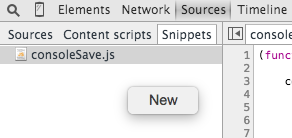
Paste the JavaScript code below into the snippet (or get the latest version from http://bgrins.github.io/devtools-snippets/#console-save)
Right click on consoleSave.js and run the snippet.
Voila, now you can call console.save() to
download objects from the console!

(function(console){

    console.save = function(data, filename){

        if(!data) {
            console.error('Console.save: No data')
            return;
        }

        if(!filename) filename = 'console.json'

        if(typeof data === "object"){
            data = JSON.stringify(data, undefined, 4)
        }

        var blob = new Blob([data], {type: 'text/json'}),
            e    = document.createEvent('MouseEvents'),
            a    = document.createElement('a')

        a.download = filename
        a.href = window.URL.createObjectURL(blob)
        a.dataset.downloadurl =  ['text/json', a.download, a.href].join(':')
        e.initMouseEvent('click', true, false, window, 0, 0, 0, 0, 0, false, false, false, false, 0, null)
        a.dispatchEvent(e)
    }
})(console)Written by Ollie Glass
Related protips
1 Response

Nice. I'll try this out. It is always good when you're debugging js issues to be able to save the console output. Now I won't have to copy paste all of them. Thanks!
Have a fresh tip? Share with Coderwall community!


JavaScript on a page runs with the privileges of that origin. One altered library, tag manager, or snippet can read inputs, change what people see, and call your APIs as the user.
Security insights from Cside